Landlord guide Sources checked September 9, 2026
How to Advertise a Rental Property
Publish a clear listing, reach renters, and turn inquiries into showings. Follow the plan below, or let Nmbr handle the leasing work.
Start with your address or Zillow link. You can also begin with a ZIP code or city and neighborhood.
Prepare → Publish → Follow up
Your rental advertising plan
Start at the step you need, whether you are preparing an ad or already receiving inquiries.
- Prepare the price, facts and photos
- Choose a rental listing network
- Write a clear, complete ad
- Check the published listing
- Reply and offer showing times
Make the listing ready to publish
- Price and costs: rent, deposit, required fees, and which utilities are included or paid separately.
- Property facts: location, bedrooms, bathrooms, verified size, availability, lease length, parking and pet policy.
- Photos: current images of the actual rooms, kitchen, bathrooms, exterior and important amenities. Show the property renters will visit.
- Next step: a working contact route and showing availability you can actually accommodate.
Compare your asking rent with similar nearby rentals, not just your mortgage payment. Use our rent-pricing guide if the price is still uncertain.
Describe the property rather than the type of person you want living there. Federal fair-housing protections apply to rental advertising; state and local requirements may add protections. Check applicable rules rather than treating an online template as legal approval. Federal fair-housing overview.
Choose where to advertise your rental
Start with one rental listing network. Add a local channel only when it offers a useful route you do not already cover.
- Not listed yet? Compare similar rentals in your area on Zillow and Apartments.com. Choose a suitable package below, then verify your ad is live.
- Already listed? Check your current distribution first. Zillow Rental Manager also publishes to Trulia and HotPads; do not treat those as three separate posting jobs.
- Need more local reach? Consider one local Facebook housing group or Marketplace, where rental posting is available to your account. Check posting rules, keep terms consistent and plan to manage messages separately. Referrals are another option.
- Views but no inquiries? Check price, photos and the contact route before adding more sites or paying for exposure.
Compare these two direct publishing options by cost and distribution, not lead quality.
| Publishing option | Basic listing and distribution | Check before posting |
|---|---|---|
| Zillow Rental Manager | Direct landlord listings can be free; the Zillow Rentals network includes Zillow, Trulia and HotPads. | Confirm the package for your property. Larger-portfolio and third-party feed arrangements can differ. Zillow's explanation. |
| Apartments.com | Its 1-4-unit package lists a free option with 21 days of standard visibility across six network sites. | Check the current package, what happens after the visibility period, and property eligibility. Premium pricing varies by market. Apartments.com's listing options. |
Zillow Rental Manager
- Basic listing and distribution
- Direct landlord listings can be free; the Zillow Rentals network includes Zillow, Trulia and HotPads.
- Check before posting
- Confirm the package for your property. Larger-portfolio and third-party feed arrangements can differ. Zillow's explanation.
Apartments.com
- Basic listing and distribution
- Its 1-4-unit package lists a free option with 21 days of standard visibility across six network sites.
- Check before posting
- Check the current package, what happens after the visibility period, and property eligibility. Premium pricing varies by market. Apartments.com's listing options.
Packages checked September 10, 2026. They can change. These are platform offers, not a list of integrations or charges included in Nmbr.
Track inquiries and booked showings by channel. Keep price and availability consistent, and remove outdated ads. Trulia explains Zillow network distribution and sharing. For a wider shortlist, see best rental listing sites for landlords.
Write an ad renters can act on
Lead with concrete property features. Put costs, availability and the next action where renters can find them.
Illustrative advertisement. Fictional property and terms, not a customer listing or a recommended rent.
2-bedroom apartment with in-unit laundry and assigned parking
$1,850/month · 2 beds · 1 bath · 950 sq ft · Available October 1
This apartment includes in-unit laundry, a dishwasher and one assigned parking space. Water and trash are included; residents arrange and pay for electricity and internet.
A 12-month lease is available. Security deposit: $1,850. This example has no application fee or other mandatory recurring property fees. Pets are considered subject to the stated pet policy; assistance-animal requests are handled separately under applicable requirements.
Message through this listing for available showing times and the application requirements.
Replace every fact and term with your own verified information before publishing. Complete the platform's location, amenity and policy fields too; the description is not a substitute for them. For more formats, see rental listing description examples.
Check the live ad as a renter
After the platform publishes your listing, open its public page on your phone.
- Is the rent, availability and location correct?
- Does the first photo show the actual property clearly?
- Are costs, utilities and key policies easy to find?
- Does the contact or showing link work?
- Have updates reached any network copies you rely on?
An ad in your dashboard is not the same as a verified public listing. Save the live links so you can check them after updates and remove unavailable listings later.
Prepare the reply before inquiries arrive
Have current showing slots, costs and application information ready. A useful first reply answers the renter's question and offers a concrete next step.
Illustrative reply: “Thanks for asking. The apartment is available October 1 at $1,850/month. Water and trash are included. Would Tuesday at 5:30 p.m. or Saturday at 11 a.m. work for a showing?”
Only offer times and terms you can honor. Apply your lawful process consistently. Finding prospects is the start; our tenant-finding guide covers the subsequent steps.
Troubleshooting
Getting views but not showings? Fix the right step
| What you observe | What to check | First action |
|---|---|---|
| Listing is missing or receives little visible exposure | Publication status, location, search filters, distribution and package limits | Verify the public listing and its searchable details before changing the ad budget. |
| Views, but few inquiries | Asking rent, total costs, first photo, missing facts or a broken contact route | Test the contact route, compare similar rentals, and correct the clearest mismatch. |
| Repeated inquiries about the same basic facts | Price, availability, utilities or policies are hard to find | Move the missing answer into the ad and structured fields. |
| Conversations, but no booked showings | Replies, available times, terms or a mismatch with the renter's needs | Review the conversations and offer specific, feasible showing times. |
| Booked showings, but no applications | Differences between the ad and the visit, property condition, price or application friction | Ask for feedback and check the property and application path before buying more reach. |
Listing is missing or receives little visible exposure
- What to check
- Publication status, location, search filters, distribution and package limits
- First action
- Verify the public listing and its searchable details before changing the ad budget.
Views, but few inquiries
- What to check
- Asking rent, total costs, first photo, missing facts or a broken contact route
- First action
- Test the contact route, compare similar rentals, and correct the clearest mismatch.
Repeated inquiries about the same basic facts
- What to check
- Price, availability, utilities or policies are hard to find
- First action
- Move the missing answer into the ad and structured fields.
Conversations, but no booked showings
- What to check
- Replies, available times, terms or a mismatch with the renter's needs
- First action
- Review the conversations and offer specific, feasible showing times.
Booked showings, but no applications
- What to check
- Differences between the ad and the visit, property condition, price or application friction
- First action
- Ask for feedback and check the property and application path before buying more reach.
Keep a simple record: channel, live date, inquiries, booked showings, attended showings, applications and changes made. Separate booked from attended visits. Change one major thing at a time where practical so you can interpret what happens next.
When is paid promotion worth testing?
Consider a limited test when the ad is accurate, the contact path works, and you have a reason to believe insufficient exposure is the problem. Confirm the price, duration, renewal terms and placement before buying.
If people already view the ad but do not inquire, more impressions alone will not fix missing terms or a broken contact link. Set a budget you are comfortable testing and judge the result by relevant inquiries and showings, not impressions alone. A short before-and-after comparison is a clue, not proof of advertising lift.
Nmbr customer case · First-day activity
A showing invitation prepared by Nmbr
3-bedroom house · Garland, TX
Day 1 snapshotPerformance update
- Inquiries
- 38
- Qualified
- 8
- Showings
- 0
Qualified is the status shown by Nmbr, not a final tenant approval. No showings were recorded in this update.
Nmbr organizes. You confirm.
Choose a proposed showing time
Nmbr presented an interested renter and two possible times. The owner still needed to confirm the arrangement.
A showing invitation, not a confirmed booking or a signed lease.
See the Nmbr service and $499 price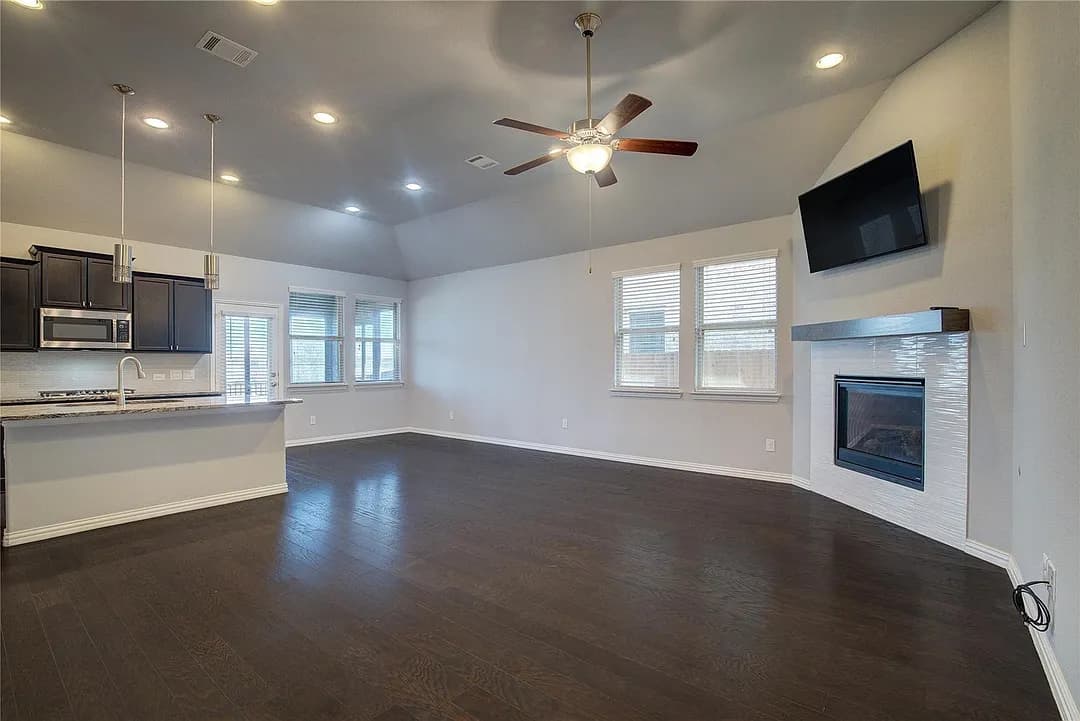
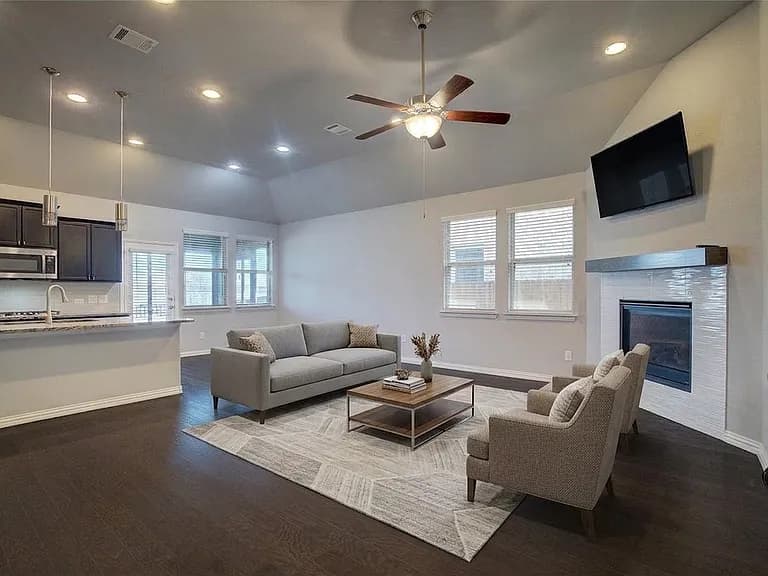
One listing, not a typical result or guarantee. The after photo uses virtual furniture; the home was advertised as unfurnished. This example does not establish that photo changes caused the inquiries.
Source details, separate lead count and proposed times
Adapted from a Nmbr admin snapshot dated September 9, 2026. Personal details removed. Zillow showed 21 hours live when checked that day.
58 leads were shown in the separate Leads tab. The Leads tab and the performance update are separate snapshots. These counts are not interchangeable or a conversion funnel.
- Fri, Sep 11 · 10:30 AM
- Sat, Sep 12 · 9:00 AM
Proposed times, not a confirmed booking in this snapshot.
Your next step
Let Nmbr handle the listing and follow-up
You do not have to manage every ad, reply and scheduling exchange yourself.
$499
One-time per listing
Listing improvement, publishing and renter follow-up.
Start with your address or Zillow link. You can also begin with a ZIP code or city and neighborhood.
Conditional 28-day refund guarantee. The period starts when payment, publication and qualifying-photo requirements are met; eligibility also depends on the written cooperation and refund-request requirements. Read the full refund policy.
Nmbr handles
- Improve and publish the listing
- Respond to renters and support pre-screening
- Coordinate showing and lease next steps
You decide
- Set rent and terms
- Confirm showing arrangements
- Approve the tenant and sign the lease
Nmbr is a leasing service, not a full property manager or a substitute for legal advice.
Separate case: one rental leased in seven days
A different property, not the Garland listing shown above.
- Confirmed visit
Within seven days after payment, recorded in Nmbr's internal reporting.
- Lease signed
Immediately after the visit, within those seven days, as confirmed by Nmbr's founder.
One anonymized customer outcome, not an average or a promised timeline. Lease timing is founder-confirmed, not independently audited. This does not establish which advertising channel caused the lease.
Before you publish
Rental advertising questions
Can I advertise a rental property for free?
Yes. Zillow Rental Manager offers free direct landlord listings, and Apartments.com lists a free basic option. Property eligibility, distribution and visibility terms differ; the publishing-options table above links to current terms. Free publication does not include doing all the listing preparation and follow-up for you.
Should I post on every rental website?
No. Start with one suitable rental listing network and check where it distributes your ad. Add a local Facebook housing group or Marketplace only where posting is permitted and you can manage the messages. If the ad already gets views but few inquiries, check price, photos and the contact route before adding more exposure.
Should I pay for a premium rental listing?
Check the problem first. Paid visibility may be worth testing when exposure is limited and the ad and contact route work. If renters already see the ad but do not inquire, investigate price, photos, costs and missing information before paying for more views.
Why is my rental listing getting views but no inquiries?
Possible causes include an uncompetitive asking rent, unclear total costs, weak photos, missing information or a contact problem. Test the inquiry route, compare similar available properties and fix the clearest issue. Views alone do not identify the cause.
Do I need an agent to advertise my rental?
You can publish directly on landlord listing platforms. Whether you also want local representation, access to a particular listing service or ongoing property management is a separate decision. Check local requirements and the exact service scope before hiring help.
What happens when I start with Nmbr?
The button opens the Nmbr chat, which first asks for your property location. Start with a Zillow link, full address, ZIP code, or city and neighborhood; you can add the full address later. Nmbr helps with pricing and listing preparation, and supports publishing, renter replies and showing coordination. You retain final decisions; the service is $499 one-time per listing, with refund eligibility governed by the written policy.
Start in Nmbr chatProduct review: Evgeny Pisarev, Nmbr founder. Published by Nmbr. Platform terms and supporting sources checked September 9, 2026. This guide is written by the provider of the Nmbr service it describes.