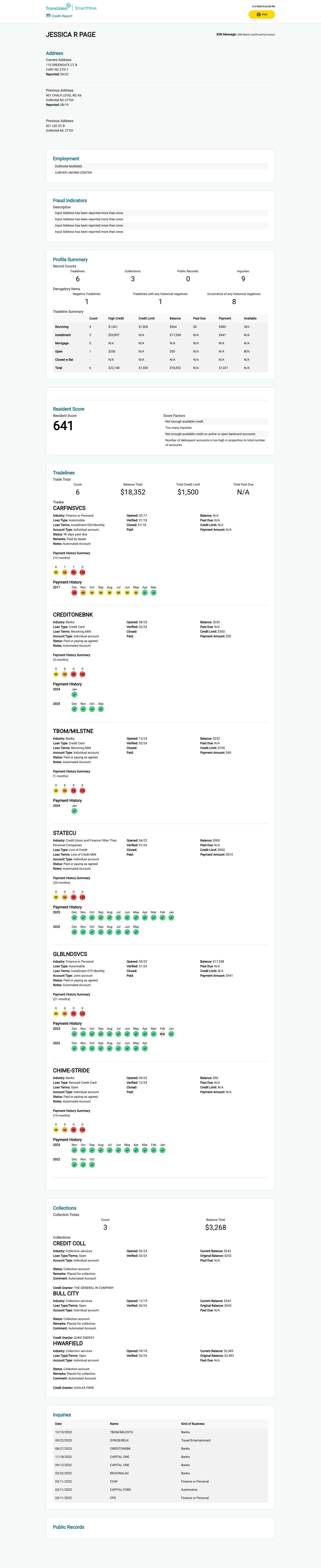
If you already have an application, compare TransUnion SmartMove, TurboTenant’s Screening Report Only and RentSpree’s No application option. If you need an application and screening together, compare Avail, TurboTenant and RentSpree. Before you invite the applicant, check for a full credit report, the fee and payer, and what’s available at the property address.
By Nmbr. Provider sources checked . Confirm the package and amount shown for your property before sending a request.
Compare screening packages
Compare four services by what each package returns, whether it needs a new application, who pays, and what the applicant must do before you see the report.
Tenant screening packages by request type, reports, fee and payer
Provider
When to use the request
Credit and other reports
Fee and who pays
Official details
Avail
Select a property in Avail and send its application with the reports you choose. Avail’s free landlord plan supports requests.
The selected TransUnion credit report includes a numerical score and credit history, including accounts and payment history. Criminal and eviction reports can be selected individually or together with credit, where available.
Basic application free. Screening examples: $30 for one report or $55 for the bundle.
TransUnion sets actual fees by address and report. The applicant pays by default. You can cover the fee. Check the total under Applications before sending.
Invite the person you’re already considering. Create a free account and order per applicant.
SmartCheck Basic lists ResidentScore and a criminal report. For a full credit report, choose SmartCheck Plus or Premium. Both add a separate eviction report, subject to availability. Premium also lists an Income Estimator and Identity Check.
Basic $25, Plus $42, Premium $49 per applicant.
Tax applies where required. Choose the payer where permitted. If you pay, SmartMove charges after the applicant consents and successfully verifies their identity.
Choose Screening Report Only when you already have an application. Use the rental application invite when you need a new application. Select a TurboTenant property for either request.
Standard screening includes a TransUnion credit report and score, a criminal check and eviction screening where available. Eligible Pro screening may add Snappt income verification and fraud detection.
Standard fee is $55 per person on Free or $45 on Essentials or Pro.
Applicable tax is extra. The renter pays in TurboTenant’s full application flow. For report-only, choose the payer before sending. If you pay, the charge is immediate and nonrefundable.
Add or select a property. Share an application with optional reports, or choose No application for report-only. Its Basic plan includes screening access.
The core package lists a TransUnion credit report and ResidentScore, criminal background and eviction records where available. Advanced Verifications add bank-verified income and reference checks.
Published pricing is $39.99 for core screening or $49.99 with Advanced Verifications.
The applicant pays by default. Choose I Pay before the applicant opens the link if you’re covering the fee. Check which reports and optional verifications are selected, and confirm the price for the property. If you pay, the documented workflow charges when you first open the submitted reports.
Select a property in Avail and send its application with the reports you choose. Avail’s free landlord plan supports requests.
Credit and other reports
The selected TransUnion credit report includes a numerical score and credit history, including accounts and payment history. Criminal and eviction reports can be selected individually or together with credit, where available.
Fee and who pays
Basic application free. Screening examples: $30 for one report or $55 for the bundle.
TransUnion sets actual fees by address and report. The applicant pays by default. You can cover the fee. Check the total under Applications before sending.
Invite the person you’re already considering. Create a free account and order per applicant.
Credit and other reports
SmartCheck Basic lists ResidentScore and a criminal report. For a full credit report, choose SmartCheck Plus or Premium. Both add a separate eviction report, subject to availability. Premium also lists an Income Estimator and Identity Check.
Fee and who pays
Basic $25, Plus $42, Premium $49 per applicant.
Tax applies where required. Choose the payer where permitted. If you pay, SmartMove charges after the applicant consents and successfully verifies their identity.
Choose Screening Report Only when you already have an application. Use the rental application invite when you need a new application. Select a TurboTenant property for either request.
Credit and other reports
Standard screening includes a TransUnion credit report and score, a criminal check and eviction screening where available. Eligible Pro screening may add Snappt income verification and fraud detection.
Fee and who pays
Standard fee is $55 per person on Free or $45 on Essentials or Pro.
Applicable tax is extra. The renter pays in TurboTenant’s full application flow. For report-only, choose the payer before sending. If you pay, the charge is immediate and nonrefundable.
Add or select a property. Share an application with optional reports, or choose No application for report-only. Its Basic plan includes screening access.
Credit and other reports
The core package lists a TransUnion credit report and ResidentScore, criminal background and eviction records where available. Advanced Verifications add bank-verified income and reference checks.
Fee and who pays
Published pricing is $39.99 for core screening or $49.99 with Advanced Verifications.
The applicant pays by default. Choose I Pay before the applicant opens the link if you’re covering the fee. Check which reports and optional verifications are selected, and confirm the price for the property. If you pay, the documented workflow charges when you first open the submitted reports.
The landlord plan price and the screening fee are separate. TurboTenant Essentials costs $149 per year for 1–10 units. TurboTenant says a new landlord’s first applicant can receive a discount. Confirm what the request shows for your property and payer. TurboTenant first-applicant fee help
In one Nmbr leasing workflow, owners are directed to TransUnion SmartMove and prompted to choose SmartCheck Premium with the applicant paying where permitted. Avail and TurboTenant also offer broader landlord software. This comparison covers screening requests.
Start with your situation
I already have a rental application
Keep the application you have and choose a report-only invitation. TransUnion SmartMove uses a separate screening request. In TurboTenant, choose Screening Report Only. In RentSpree, edit the package and choose No application. In Avail, the public instructions start in the property’s Applications area. Its public instructions describe screening through an Avail application. Check what the applicant would need to complete if your application is elsewhere.
Worked decision: You have the application and want to pay
TurboTenant. Choose to pay and send the Screening Report Only request. TurboTenant charges you at that point, and the fee is nonrefundable.
RentSpree. In the landlord dashboard, create a screening request for the property and choose No application. Select I Pay before the applicant opens the link. The payer setting then locks. RentSpree’s help says you pay when you first open the submitted report through Pay & View Reports.
TransUnion SmartMove bills the owner at a different point, after the applicant consents and successfully verifies their identity. Check the payer and timing your provider shows before sending the request.
If you use Avail, choose the screening reports you need when setting up the property’s application. In TurboTenant, choose the application invitation and check the fee the renter will pay for your landlord plan. Its owner-paid screening option uses a separate report-only request. In RentSpree, select whether to collect an application alone or add screening.
A score is one number. A credit report lets you see credit history, such as accounts, payment history and balances. In TransUnion SmartMove, check SmartCheck Plus or Premium for the full report. Avail shows a sample of its full TransUnion report. TurboTenant’s standard screening and RentSpree’s core package list the credit report itself. Open the provider’s example or package details before you pay.
Check the property’s rules. Look up state and local rules for passing a fee to the applicant, accepting reusable reports, and the timing and use of criminal or eviction records. Confirm what the provider can return for the address. For covered rentals in New York, landlords generally can pass on only the actual screening cost or $20, whichever is lower. The fee must be waived if the applicant gives you a qualifying report from the past 30 days. See the statute for details and exceptions. New York Real Property Law § 238-a. RentSpree also says it does not return eviction reports for applications in New York. RentSpree location restrictions
Confirm the report, payer and charge timing. Check the price in the provider’s request before you send it. Let the applicant know what they will be asked to authorize and whether they are expected to pay.
Send the provider’s invitation. The provider handles applicant authorization and any identity checks it requires. Wait for the applicant’s steps before expecting the report. Use the provider’s own portal for sensitive information. Avail application and authorization steps
Can I request a tenant screening report after I already have an application?
Yes. SmartMove sends its own screening invitation. TurboTenant offers Screening Report Only, and RentSpree offers No application when you edit the screening package. The applicant still has to complete the provider’s required authorization and verification steps.
Does a tenant screening score include a full credit report?
A score is a summary measure. Look for the full credit report as a separate package item to see underlying credit history. SmartMove lists a credit report in SmartCheck Plus and Premium. SmartCheck Basic lists ResidentScore and a criminal report.
Can the landlord pay for tenant screening?
All four providers document a landlord-pay option. Check whether it applies to the request type and location before you send it. In TurboTenant’s full application the renter pays. Its report-only flow allows the landlord to pay and charges them immediately. RentSpree lets you select I Pay when setting the screening package.
Why might a criminal or eviction report be missing?
Availability varies by the property’s location, the provider’s record coverage, and the stage of the application. In some locations, reports are limited or released later. Check the provider’s current restrictions for your address.